How-to
How to solve Afterglow
One window changes its neighbors. Learn to read the ripple, undo a wrong turn, and make your next move with a reason.
By ClickClick · · 3 min read
Learn what one press actually changes
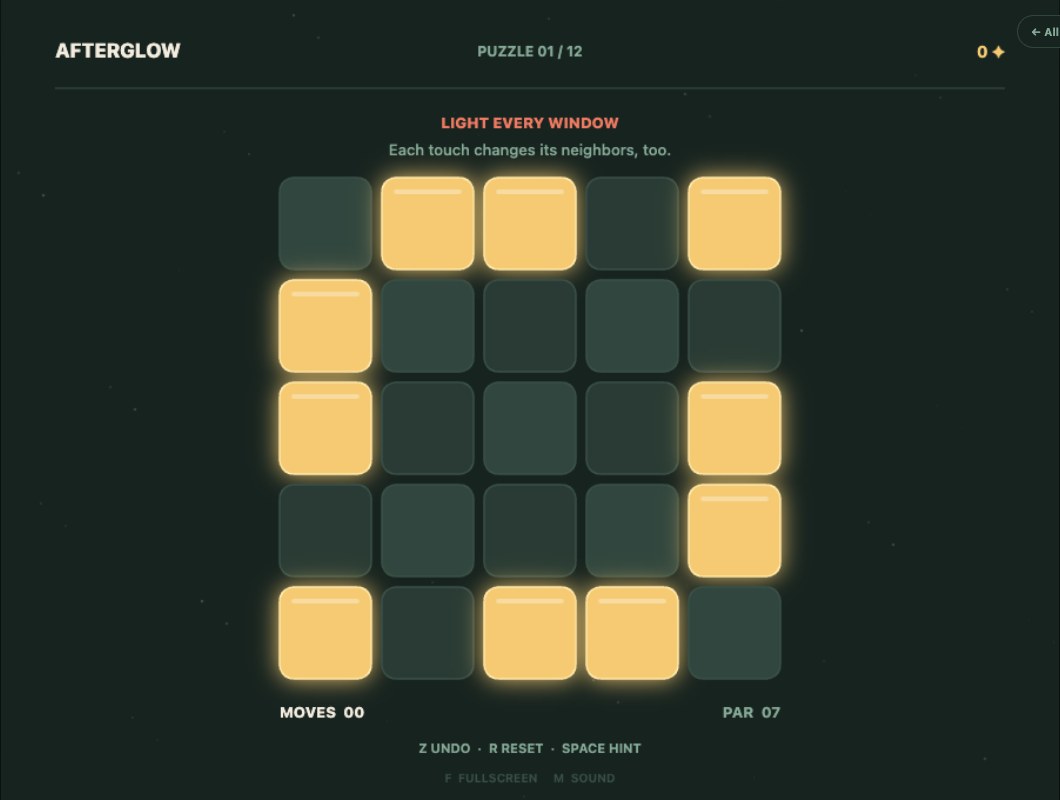
Afterglow is a light-switching puzzle on a five-by-five board. Your goal is to turn every window on. Selecting a window flips its state and the windows directly above, below, left, and right of it. A lit window turns dark; a dark window lights up. Diagonal windows do not change.
A middle window affects five cells, an edge window usually affects four, and a corner affects three. Before you press, trace that small cross. This is the most useful first habit: judge the whole change rather than looking only at the window under your pointer.
Two presses cancel each other
Press the same window twice and every affected light returns to its original state. You can use this to test your understanding on any board: note the lights around one window, press it, and press it again. The picture is restored, although both presses count as moves unless you use Undo.
The order of a fixed set of presses also does not change the final picture. If two selected windows affect the same light, that light flips twice. This means a solution is about finding a useful set of switches, rather than finding one special timing or click order.
Try a tiny thought experiment
Picture an otherwise fully lit board with only its top-left corner and the two windows immediately beside it dark. Pressing that corner flips exactly those three dark windows on and completes the board. Pressing the window one step inward would affect extra lights and create a different problem.
This is a teaching example, not a claim about a particular numbered stage. It shows why the shape of a dark patch matters. Look for a group that matches a switch's footprint, then check what happens outside that group before committing.
Make a plan you can check
The twelve stages give you room to practise. A board does not need to get brighter after every useful move: sometimes one press makes a temporary dark window that another press repairs. Work with a small plan so you can tell whether a change helped.
- Pick a dark window and identify every switch that could change it.
- Choose one candidate and predict its entire footprint.
- Make the press, then compare the result with your prediction.
- Use Undo if the idea was wrong, or Hint if you cannot find a useful next step.
Use hints to learn the pattern
A hint is most useful when you pause before following it. Trace the suggested switch's footprint and ask what it changes. Then play the move and see whether it connects with another part of the board. You are learning how the switches interact, not just collecting a completed stage.
Once you can finish a stage, return and try fewer moves. Avoid repeating the same switch, and use Undo instead of pressing again to reverse an experiment. Afterglow keeps supported progress in this browser; clearing site storage or changing devices does not carry it with you.
Updated